Contacting a Driver
Once a driver accepts your dispatch, you will be able contact the driver directly from the mobile app. To contact the driver, please do the following:
1) Press My Orders at the bottom of your mobile phone app
2) Select the dispatch for which you'd like to contact the driver for
3) Press the Call Driver button at the bottom of the screen
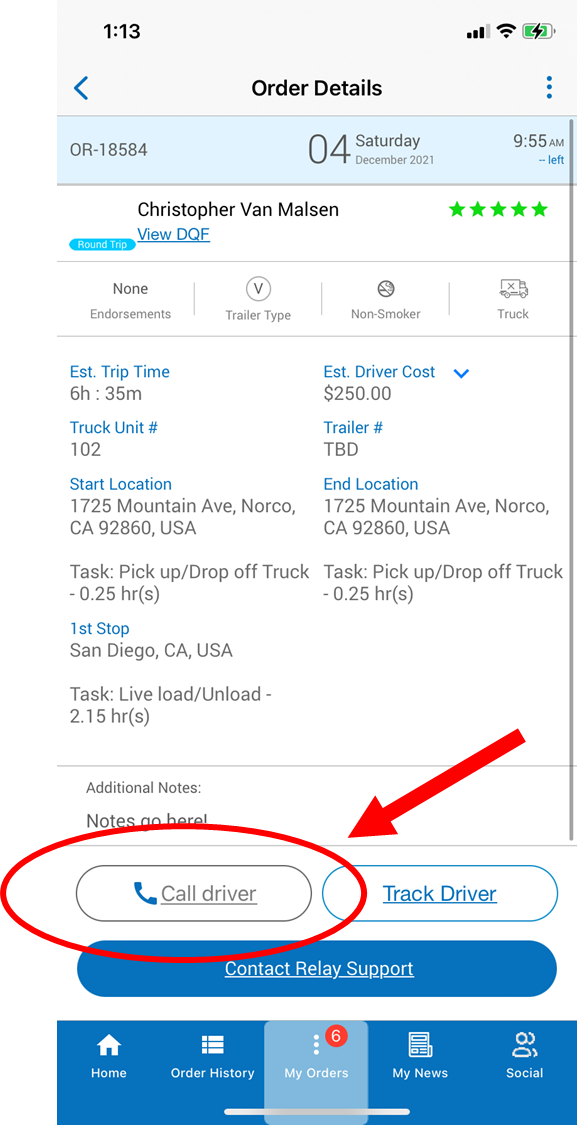
1) Press My Orders at the bottom of your mobile phone app
2) Select the dispatch for which you'd like to contact the driver for
3) Press the Call Driver button at the bottom of the screen
You will also find their contact information in their Driver Qualification File. The driver's phone number will be on the first page at the top.
Related Articles
Adding a Driver to Your Preferred Network
To add a driver to your Preferred Network so you can directly assign orders to them: 1) Click on Order History: 2) Find an order that a driver completed who you'd like to add to your Preferred Network: 3) Press 'View Order >>' 4) Press 'Rating' at ...Selecting Your Preferred Driver Tiers
What Different Driver Tiers Offer We allow you to customize the types of drivers that who can accept your runs and the certification level you are most comfortable working with. Keep in mind that with the more driver tiers you select, the larger the ...Adding a Driver to Your Insurance
To easily add a driver to your insurance, you will need to send their DQF (Driver Qualification File) to your insurance. The driver's DQF will have information on it such as the front and back of their license, current MVR driving record, medical ...Multi-Driver Blocks
WELCOME TO MULTI-DRIVER BLOCKS What are Multi-Driver Blocks? Multi driver blocks are an easy way to place multiple orders and book multiple drivers at the same time in order to maximize up time on your truck. Multi driver blocks are used to help ...Directly Hiring a Permanent Relay Driver
To directly hire a Relay driver permanently, please use the following steps: 1) On your web portal, click the Past Drivers tab 2) You'll now see all of the Relay drivers you've worked with and their eligibility for direct hire. 3) After speaking to a ...