Using the Relay Acceptance Predictor
The Relay Acceptance Predictor is the most important tool you will use to guarantee your runs get picked up fast.
The Relay Acceptance Predictor gives you immediate feedback on the dispatch/orders you place. The Relay Acceptance Predictor will give you a RAP Score, that indicates how likely your dispatch will be accepted before the scheduled start time. The RAP Score is number that ranges from 0 – 100.
Simply put, the higher the RAP Score the more likely the dispatch will be accepted by a driver. To basically guarantee a driver will accept your dispatch, you want the RAP Score to be at 90 or above.
A lower RAP Score does not necessarily mean the run will not be accepted. A lower RAP Score simply suggests that drivers are more likely to accept another carrier's dispatch before they would accept yours.
Screenshot of the Relay Acceptance Predictor
The higher your RAP Score, the higher the likelihood that your order will be accepted by a driver in your area.
The RAP Score for an order is calculated by numerous factors including, but not limited to:
The amount of time in advance you entered the dispatch
How many working hours the run requires
Your minimum preferred driver tier
The driver pay rate
Driver availability in your area
The system will take all of these factors into consideration when you enter a dispatch, and give you an immediate idea on the likelihood your run gets accepted by a driver.
To help keep your RAP Score high, it is recommended that you:
Post your orders at least 72 hours in advance. This gives Relay drivers in your area plenty of time to see the run and ask questions about it, especially if it is a regional or OTR route.
Set your rate above the market rate. A higher rate makes the order stand out amongst other runs.
Allow Tier 3 drivers to be able to see and accept your orders. The more drivers that are able to see the run, the more likely it is to be accepted by one of them.
You can use the information given to you from your RAP Score to ensure that your runs get picked up consistently. If your runs are not getting picked up, be sure to check your RAP Score as it updates in real time. You can always use the suggestions from the system to quickly update your order and boost your RAP Score.
Increasing Your RAP Score from your Web Portal
To quickly increase your RAP Score for one of your dispatches from your web portal, please do the following:
1) Click on Relay Orders at the top of your screen
2) Click the Scheduled option
3) Click the icon next to the colored RAP Score
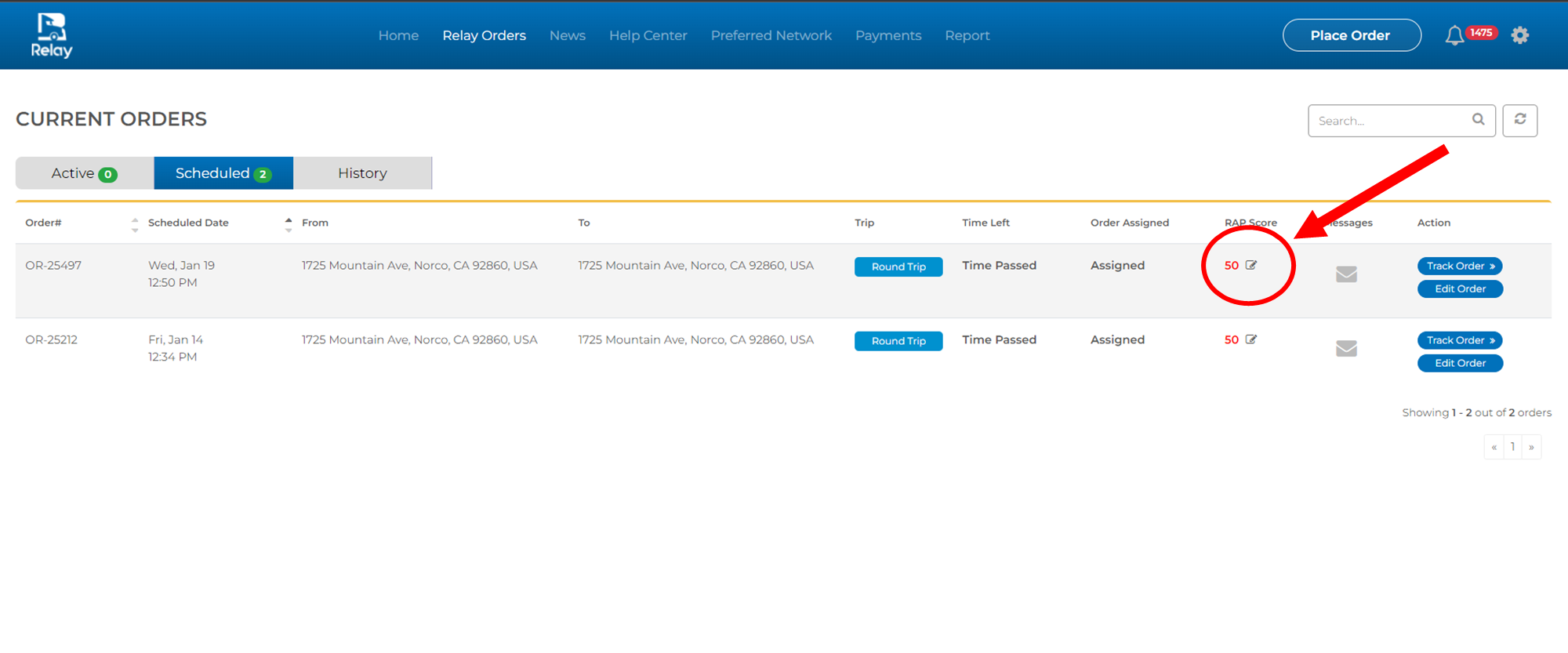
4) Select the changes you would like to make and press the Save Changes button
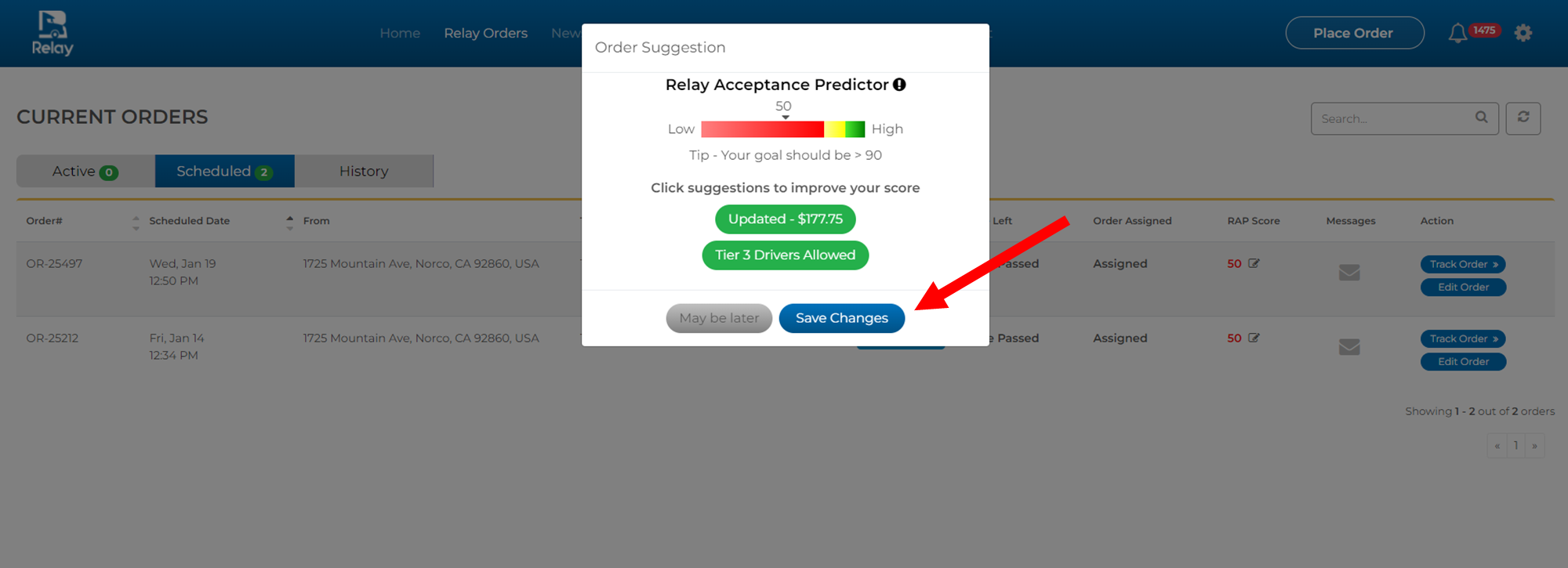
Increasing Your RAP Score from your Phone
To quickly increase your RAP Score for one of your dispatches from your phone, please do the following:
1) Click on My Orders at the bottom of your screen
2) Select the Scheduled option at the top of the screen
3) Select the dispatch that you would like to increase the RAP Score for
4) Tap on the RAP Score box:
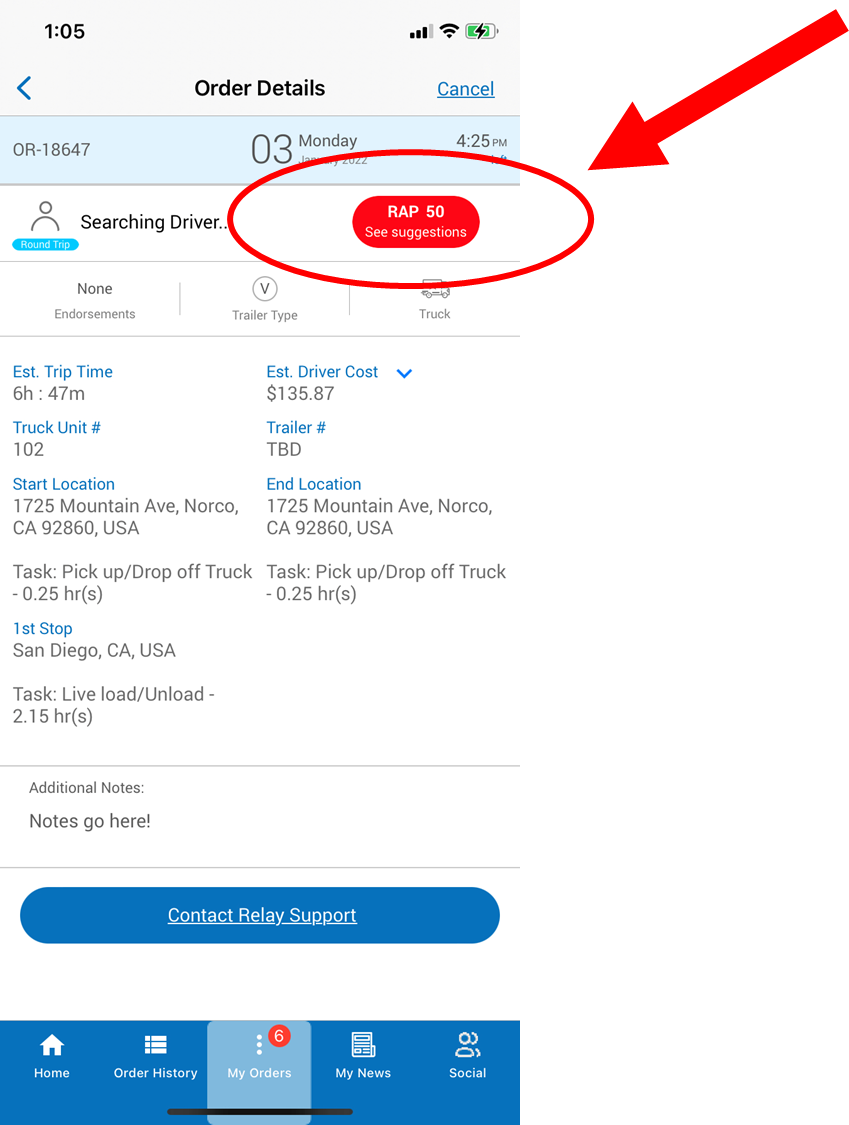
5) Select the changes you would like to make and press the Save Changes button
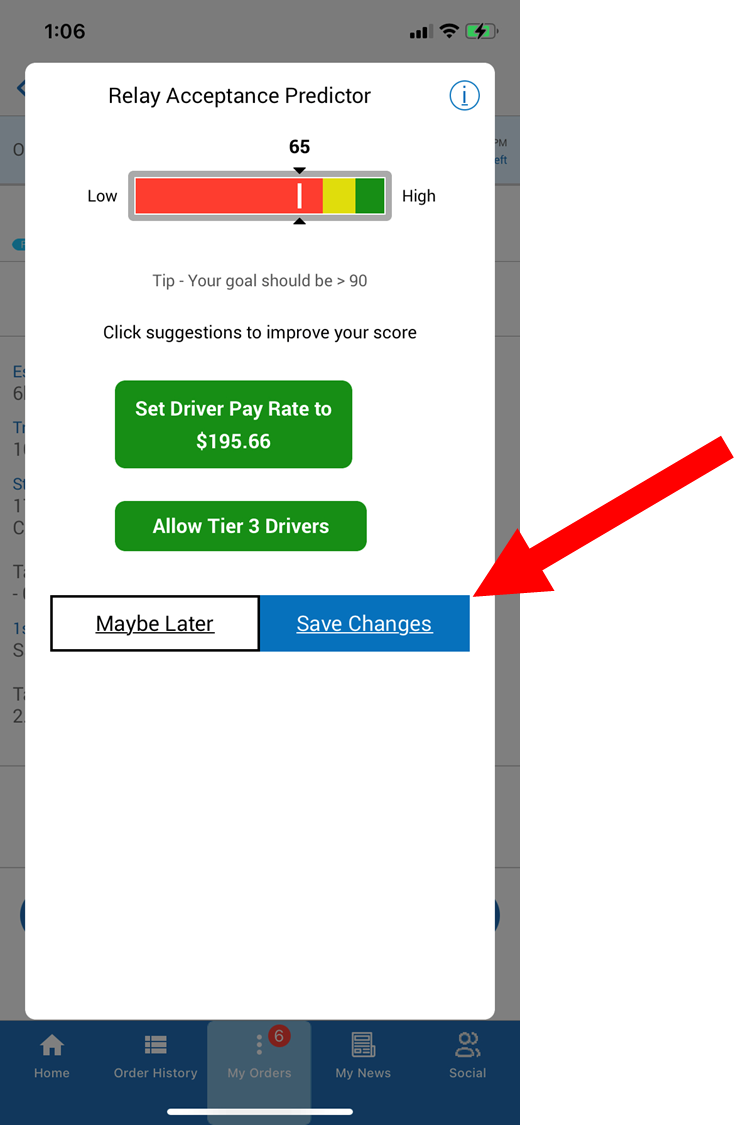
5) Select the changes you would like to make and press the Save Changes button
Related Articles
What happens if my run doesn't get accepted?
When using the RAP Score (Relay Acceptance Predictor) correctly, about 98% of all runs get accepted. If your dispatch does not get accepted by the scheduled start time, we recommend the following: 1) Reschedule your order to the next day or whatever ...Using the Relay Social Feature to Message Potential Drivers
Relay Social is a mobile feature that makes it easier than ever for you to connect with Relay Drivers in your area, allowing you to build relationships on the Network. You can find the Relay Social tab in the lower right-hand corner of the Relay On ...Importance of Your Rating
Why Your Rating Matters Drivers are able to see what other drivers have rated carriers before they accept a run. Because of this, a carrier's rating is an important factor in the first impression that you make on a driver. Similar to how carriers ...Using Fuel Codes through Relay
What is the Relay Fuel Code Program? As a carrier on the Relay Network, you now have access to a nationwide fuel program that automatically locates the best fuel discounts based on your driver's location and issues a pre-authorized fuel code for the ...Directly Hiring a Permanent Relay Driver
To directly hire a Relay driver permanently, please use the following steps: 1) On your web portal, click the Past Drivers tab 2) You'll now see all of the Relay drivers you've worked with and their eligibility for direct hire. 3) After speaking to a ...